Blog
Research and guides on live chat.
Studies built on primary sources, install guides for the platforms you build on, and notes on running support across many sites.
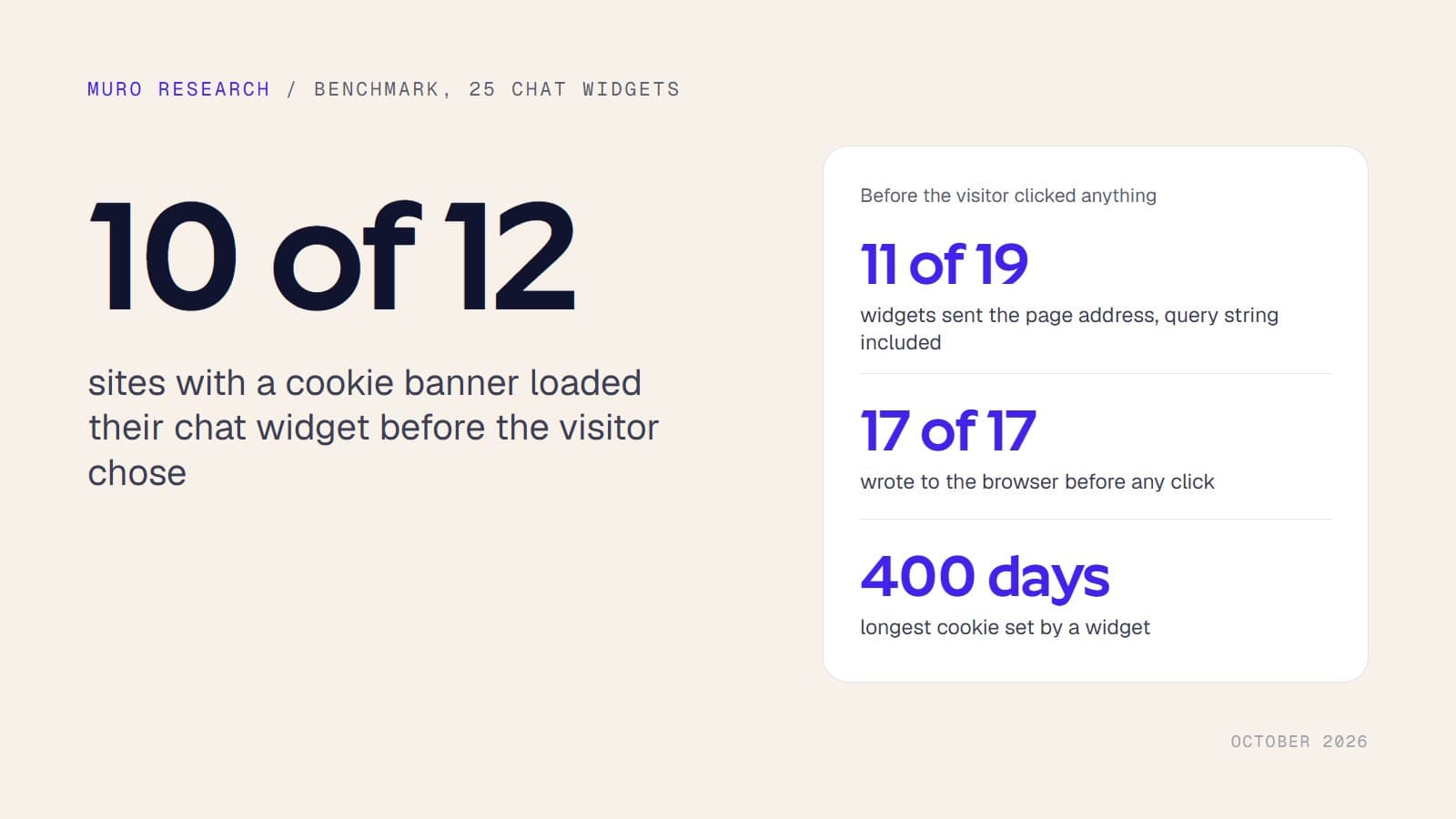
Research
10 studies built on primary sources: regulators, official statistics, vendor documents and our own measurements. 8 of them ship their dataset as a CSV you can download and check.
Research8 min readOpen data
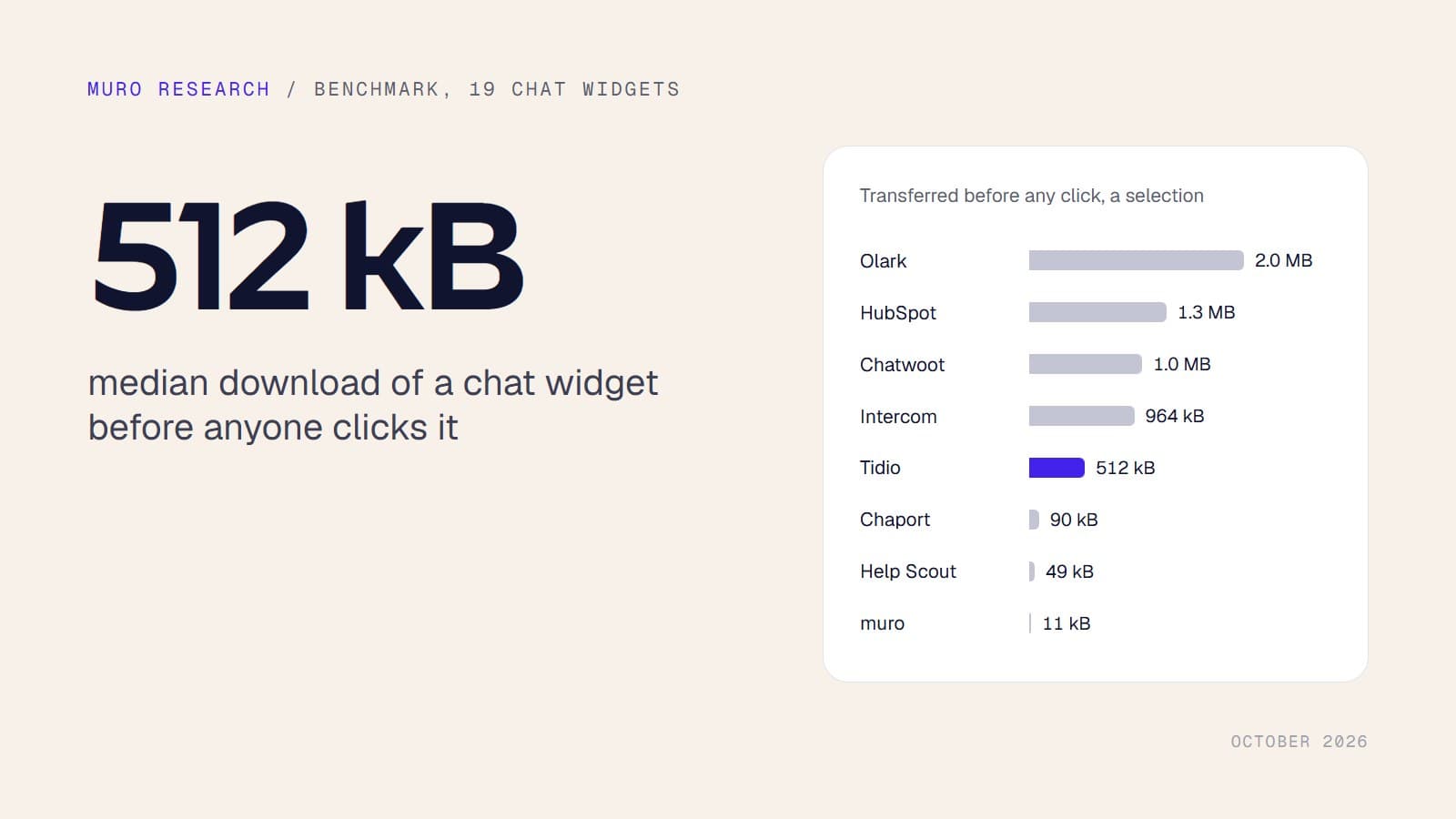
Chat widgets download a median of 512 kB before anyone clicks. We measured 19
19 chat widgets weighed on their makers' own websites: a median of 512 kB transferred and 1.2 MB of JavaScript once unpacked, before any click. Ten download more than half a megabyte.
Research9 min readOpen data
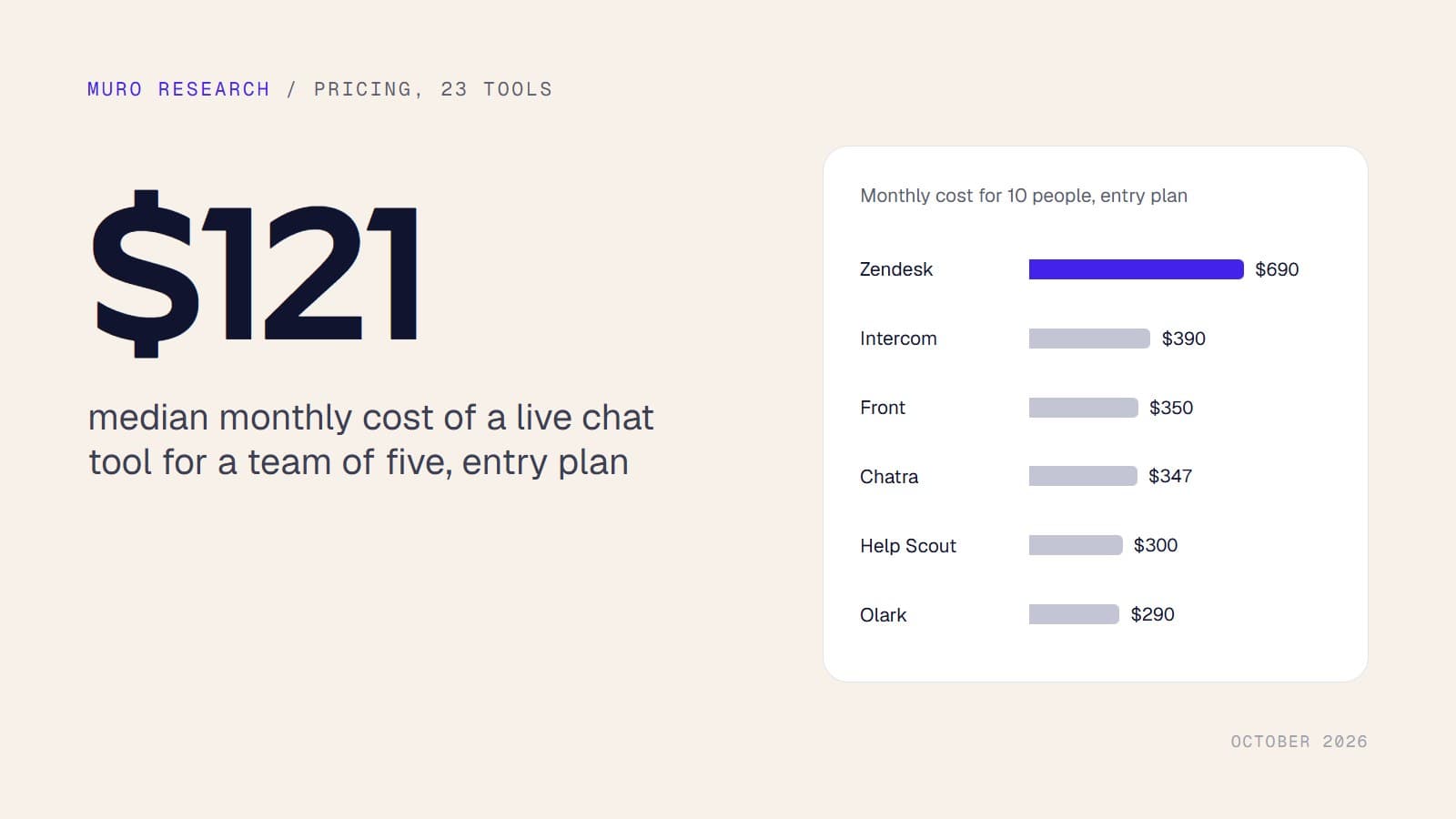
Live chat pricing in October 2026: what 23 tools charge, and what a team really pays
List prices of 24 live chat tools captured on 2026-10-10. The median entry plan costs $29 a month for one person and $240 for ten.
Research10 min readOpen data
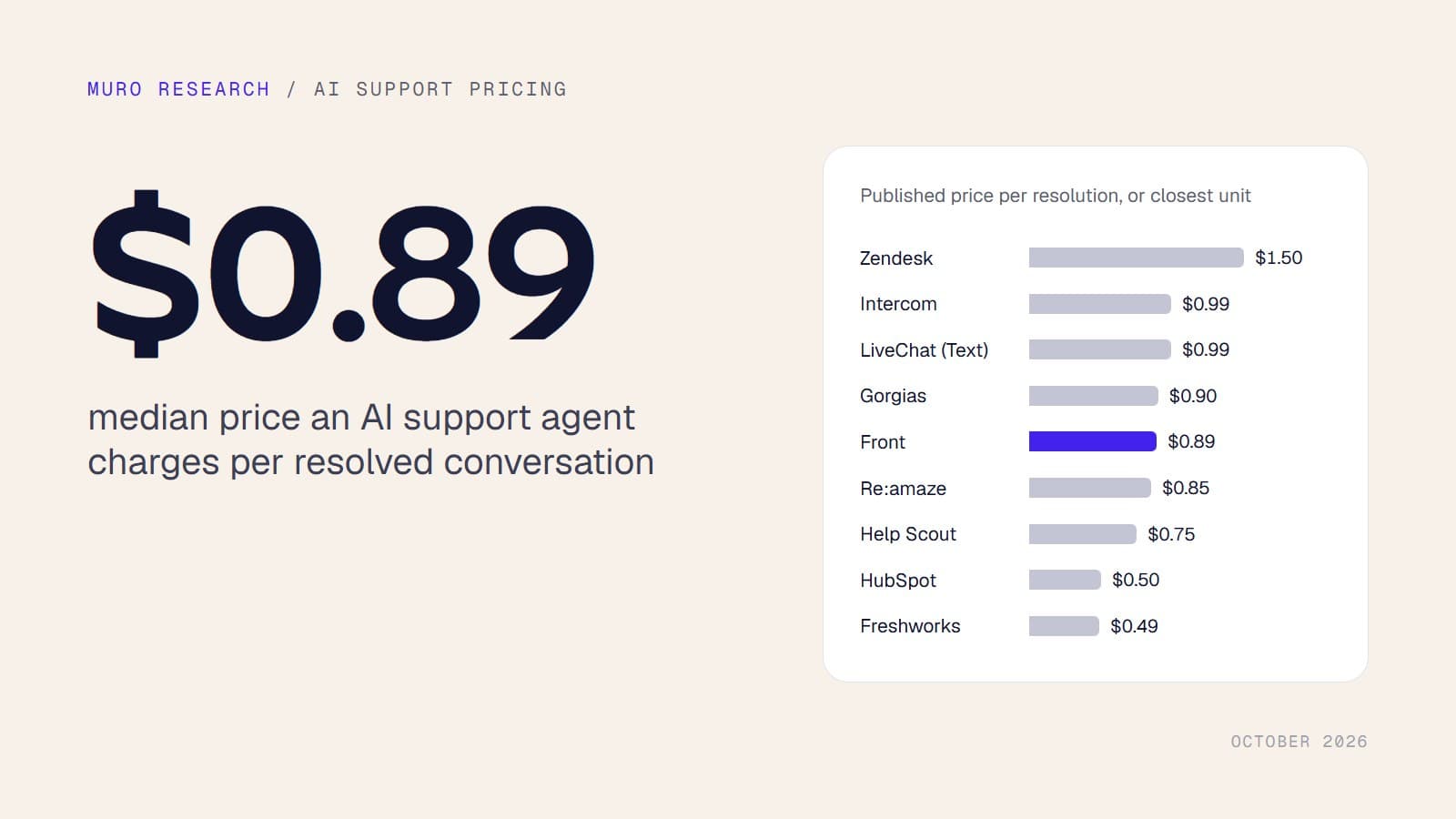
AI support agents bill a median of $0.89 per resolved conversation. The model behind them costs cents
Published prices of 20 AI support agents, captured on 2026-10-10: the median is $0.89 per resolved conversation. At current list prices the model cost of a long support conversation runs from 0.74 cents to 74 cents.
Research11 min readOpen data
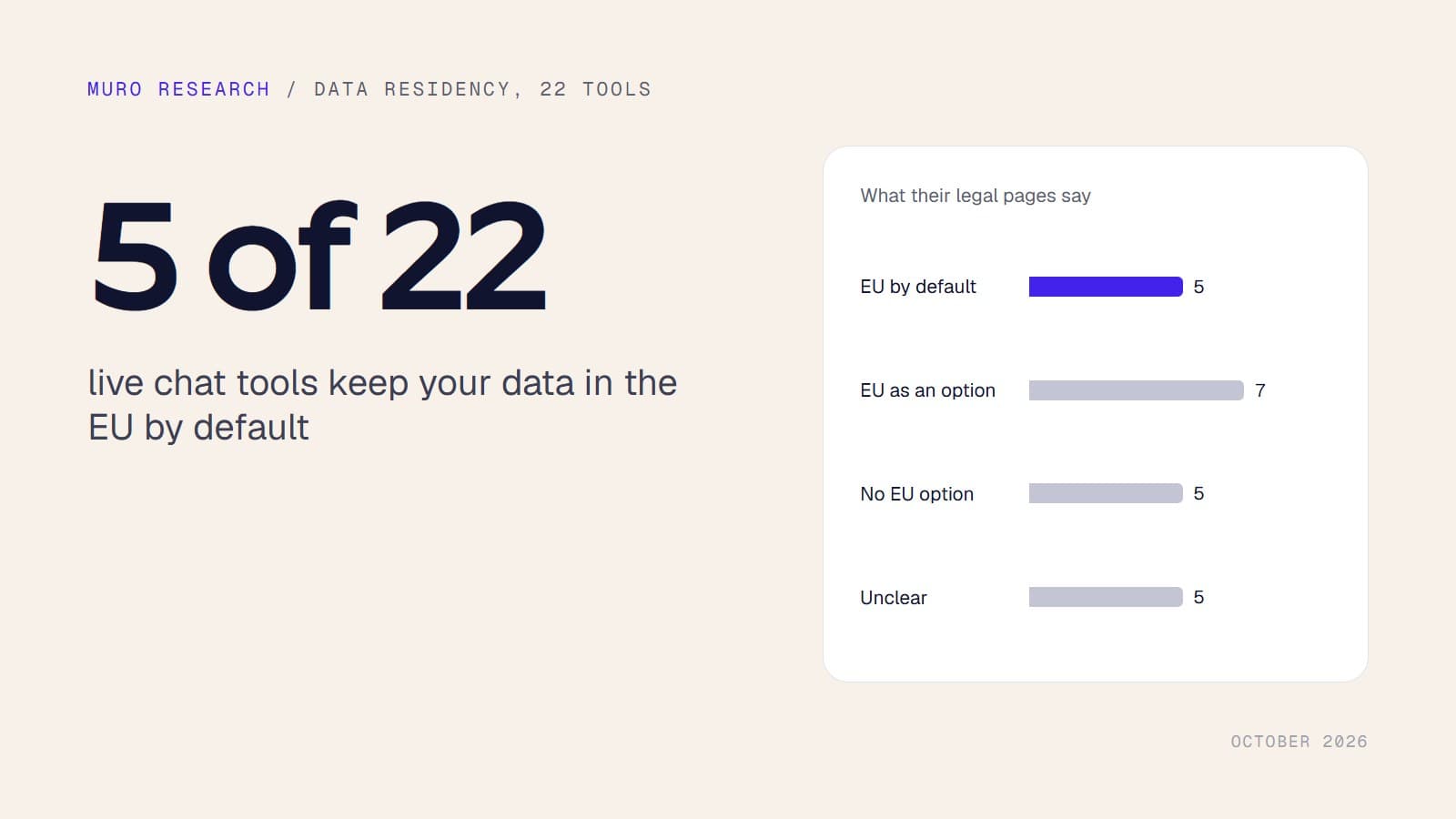
Only five of 22 live chat tools keep your data in the EU by default
5 of 22 live chat tools store customer data in the EU by default, 7 offer it under conditions, 5 do not offer it and for 5 their own pages do not say. Every finding comes with the quote and the page it was taken from.
Research12 min readOpen data
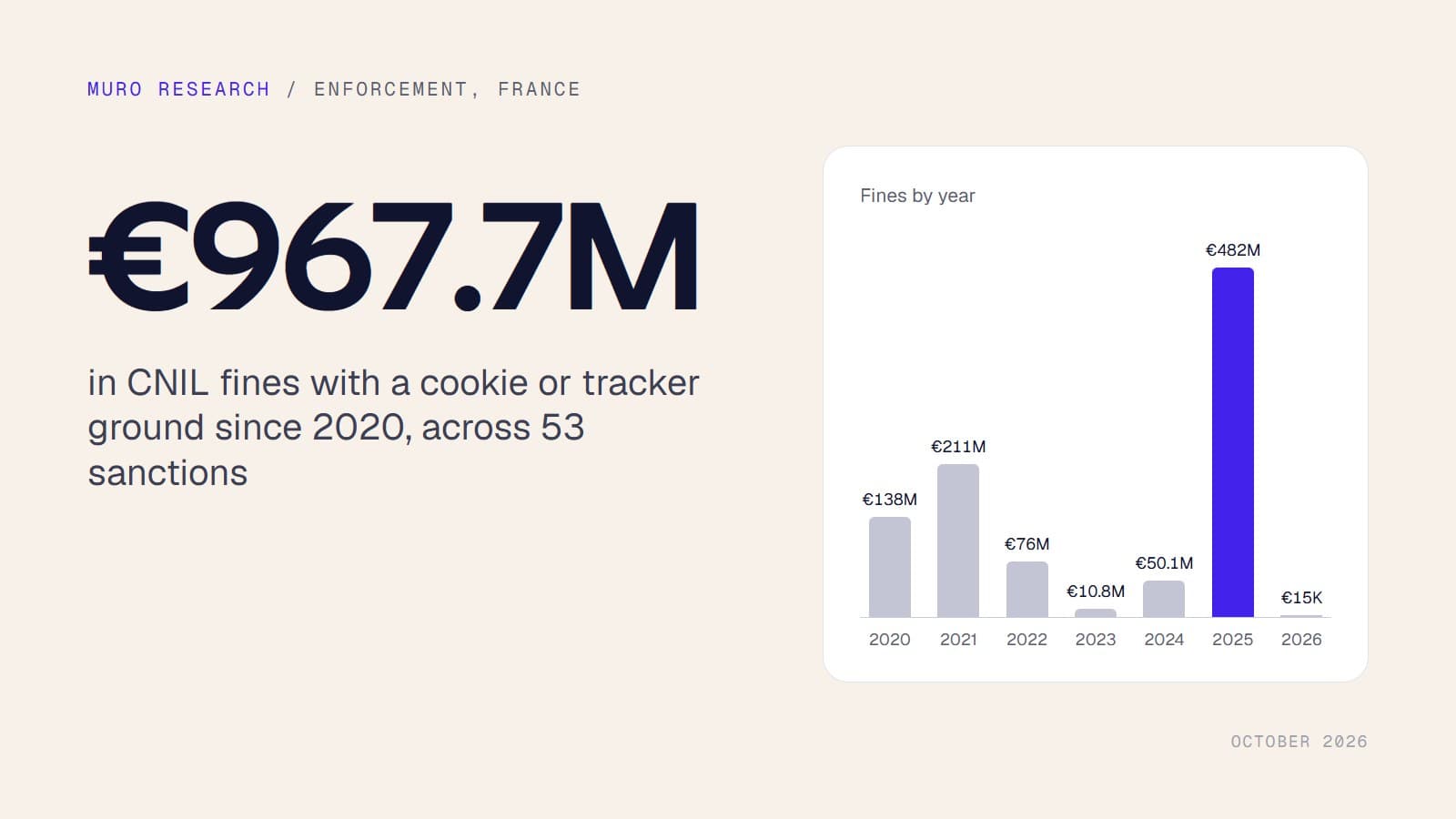
Every CNIL cookie fine since 2020: 53 sanctions, up to €967.7 million
53 CNIL sanctions since 2020 have a cookie or tracker ground, for €967.7 million in fines. The full list with amounts, grounds, decision numbers and appeal outcomes, plus the largest decisions elsewhere in Europe.
Research12 min readOpen data
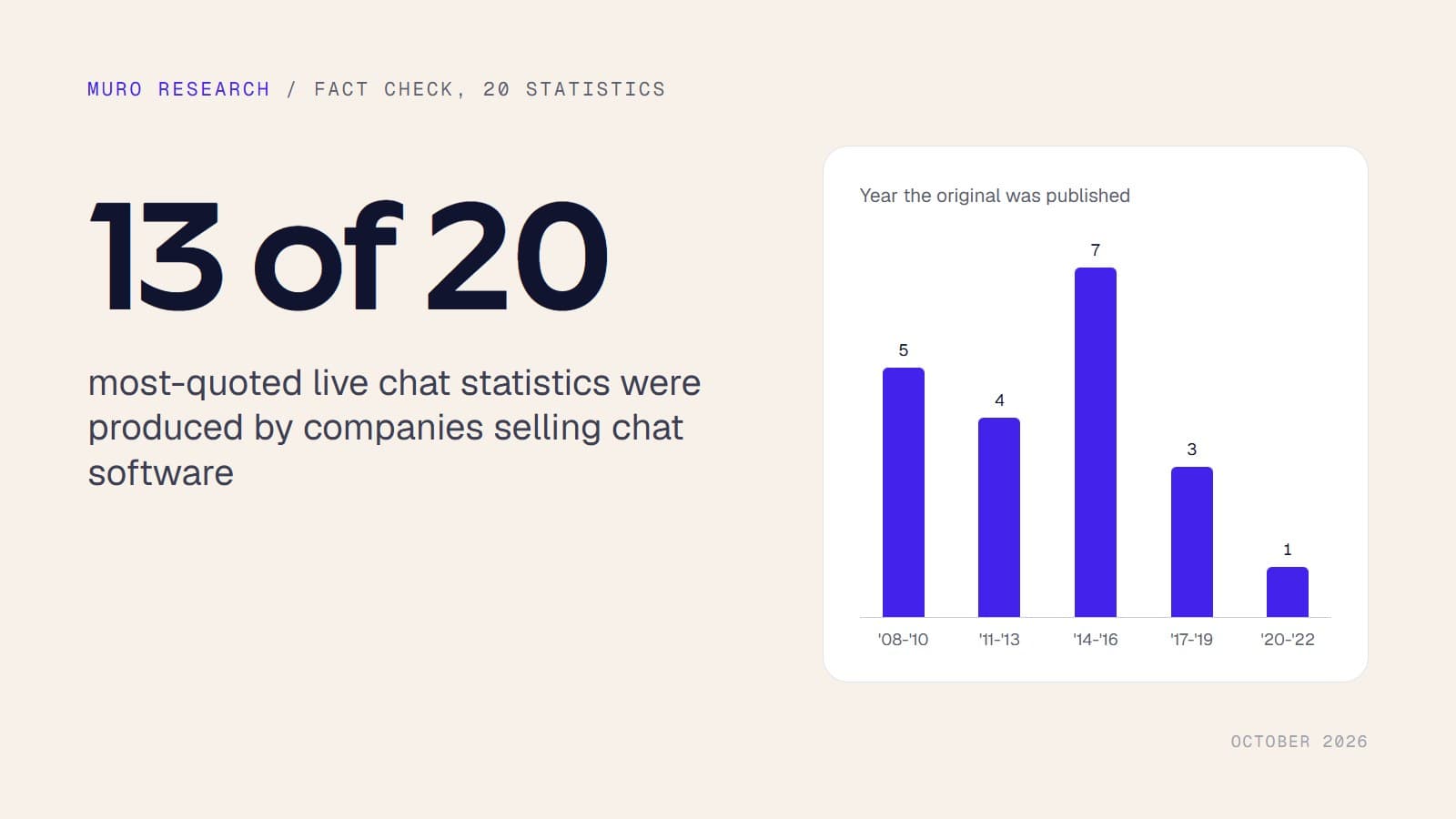
We traced 20 popular live chat statistics to their source. 16 are more than ten years old
20 live chat statistics traced to their origin: 14 found in the original document, 6 not. 13 were produced by chat or support software vendors, the verified ones date from 2009 to 2018, and none comes from a controlled experiment.
Research7 min readOpen data
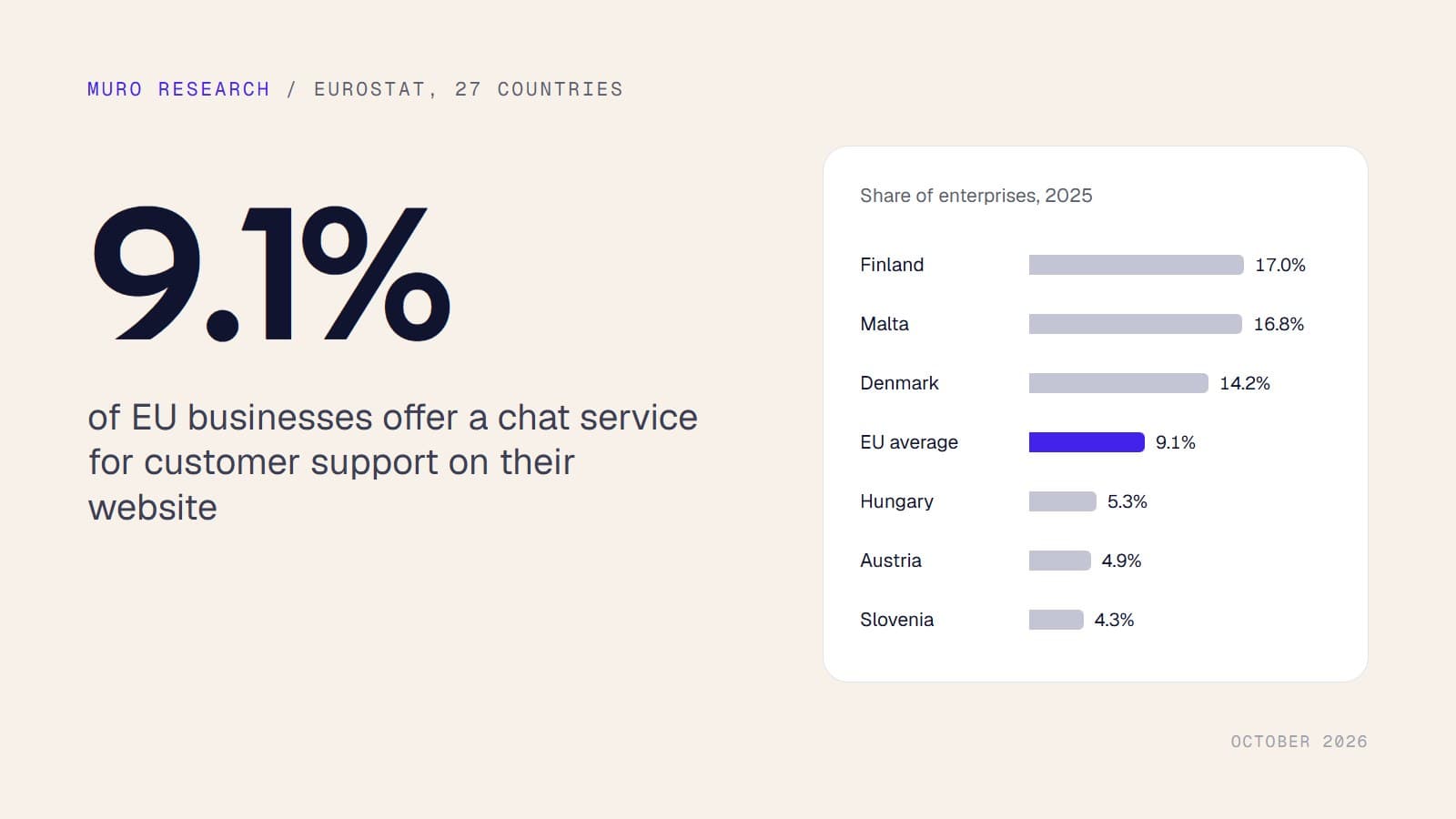
Only 9.1% of EU businesses offer chat support on their website
Official Eurostat data: 9.1% of EU enterprises with 10 or more employees had a chat service for customer support on their website in 2025, from 17.0% in Finland to 4.3% in Slovenia.
Research9 min read
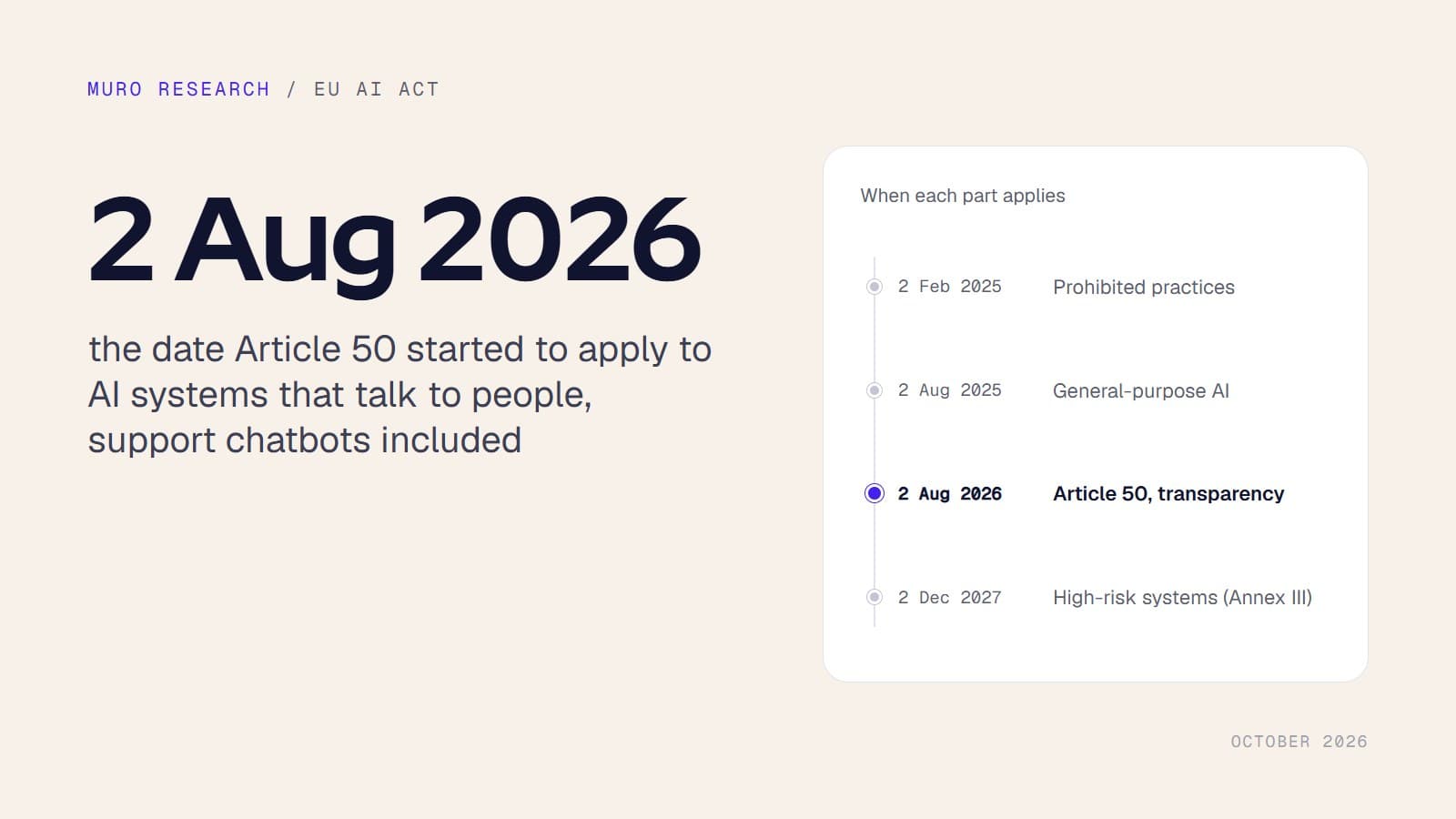
AI Act Article 50 and support chatbots: what has applied since 2 August 2026
Article 50 of the EU AI Act has applied since 2 August 2026. Who must disclose that a chatbot is an AI, how, by when, and what the fines are, with the exact wording of the Regulation and of the Commission guidelines.
Research10 min read
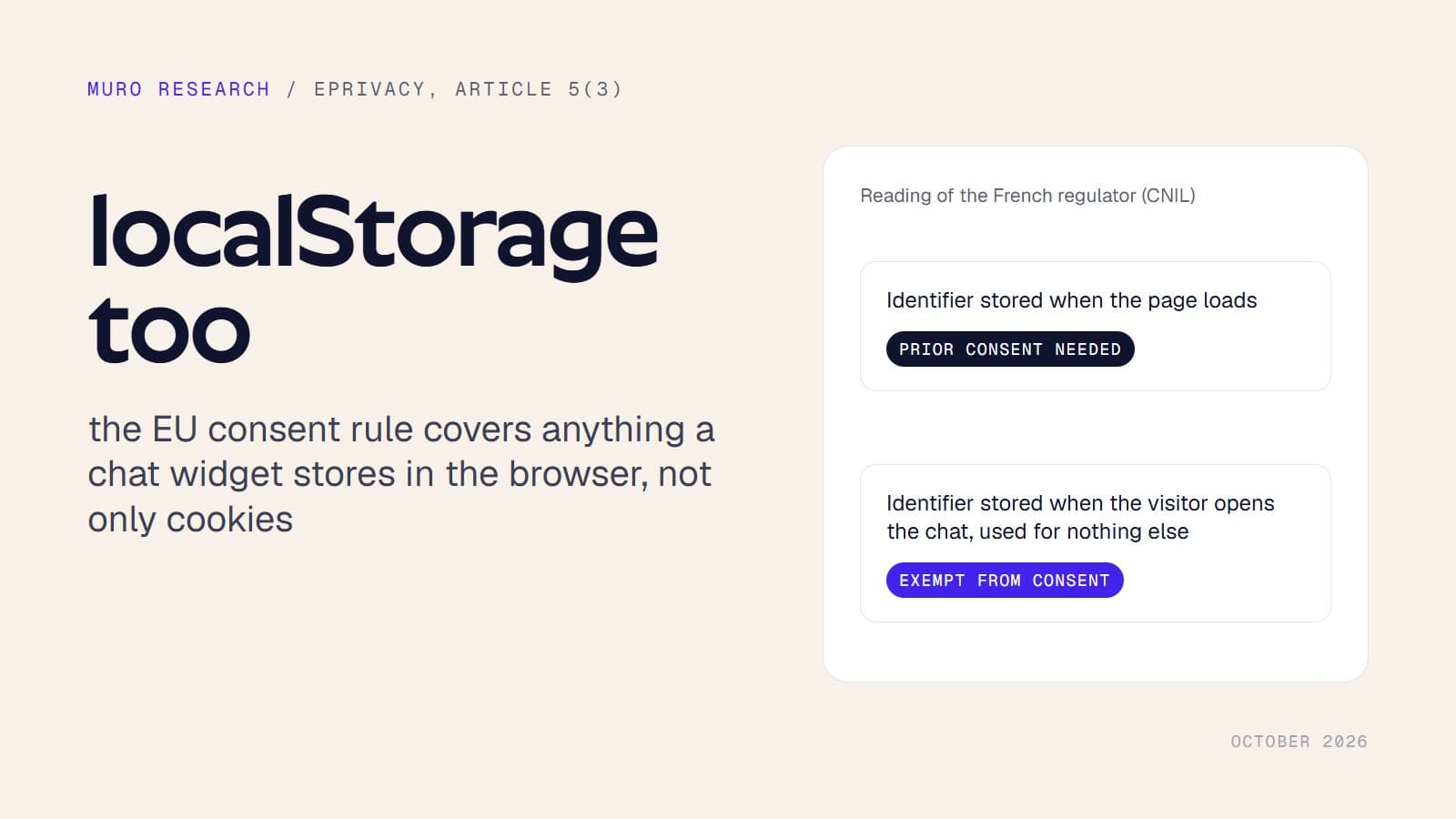
Does a chat widget need cookie consent? What EU regulators actually say
The ePrivacy rule on storing information in the browser, the EDPB guidelines on its technical scope, and the only official guidance that names chat widgets, quoted and put side by side.
Guides
36 articles
Guides7 min read
Django live chat: add a widget to base.html without touching Channels
Add live chat to a Django app with one edit to templates/base.html: no Channels, no ASGI migration, no Redis. The admin stays clean because it never extends your base template, and a tiny context processor keeps the widget off staging. Then point muro's AI at your docs so most questions answer themselves.
Guides7 min read
How to add live chat to Docusaurus (and let it answer from your docs)
Docusaurus visitors are mid-problem, which makes docs the best chat surface you own. This guide covers the scripts array trap, the src/theme/Root.js install that actually works, and how to point muro's AI at your docs so the widget answers from the pages your users are already reading.
Guides7 min read
How to add live chat to a Rails app (without fighting Turbo)
A Turbo-safe guide to adding live chat to Ruby on Rails. Where the snippet goes in application.html.erb, why Turbo Drive does not break it, how to keep chat out of your admin layout, and how to turn on AI replies grounded in your docs.
Guides7 min read
Add live chat to Remix: the React Router v7 install guide
A practical guide to adding live chat to a Remix or React Router v7 app. Install the muro widget in app/root.tsx with dangerouslySetInnerHTML, understand exactly what happens through hydration and client-side navigation, then point the AI at your docs so it answers the repetitive questions for you.
Guides7 min read
Add live chat to a Vue app: the Vue 3 + Vite guide
Two ways to add live chat to a plain Vue 3 + Vite app: a one-line paste in index.html or an onMounted loader in App.vue. Includes the vue-router nuance that trips people up, and how to switch on grounded AI replies that hand off to a human when it matters.
Guides7 min read
WooCommerce live chat: three ways to install it and train the AI on your store policies
Three ways to add a live chat widget to a WooCommerce store: a snippet plugin, a wp_head hook in functions.php, or a child theme's header.php. Plus the caching plugin settings that hide widgets from shoppers, and how to train an AI on your shipping and returns policies so it converts pre-sale questions and hands order issues to you.
Guides7 min read
Cline MCP guide: triage customer support without leaving VS Code
Cline can do more than write code: point it at a hosted MCP server and it becomes a support triage agent inside VS Code. This guide covers the exact cline_mcp_settings.json config for muro, read vs write API key scopes, and a morning triage prompt that executes step by step instead of just summarizing.
Guides7 min read
Connect GitHub Copilot to your support inbox with MCP
GitHub Copilot in VS Code can call MCP servers in agent mode, which means it can read your customer conversations, not just your code. Here is the full setup with muro's hosted MCP server: one scoped API key, a few lines in .vscode/mcp.json, and a triage-fix-reply loop that never leaves the editor.
Guides7 min read
Zed MCP: read support tickets and draft replies without leaving your editor
Zed's agent panel speaks MCP, and muro exposes your support inbox as a hosted MCP server. This guide wires them together with npx mcp-remote and a per-site API key, then walks the full loop: triage what users reported, read the thread, fix the bug, and draft the reply without leaving the editor.
Guides7 min read
Laravel live chat: add a widget to your Blade layout in ten minutes
Add live chat to a Laravel app with one edit to your Blade layout, keep it off admin routes with a simple @if, and use Blade stacks if you like things tidy. Then point muro's AI at your docs so most questions answer themselves, with reply-by-email for the rest.
Guides7 min read
How to add live chat to a Notion website (the honest version)
A plain notion.site page cannot run custom scripts, so most Notion live chat tutorials are wrong from the first step. This guide covers the two routes that actually work: a Notion site builder with code injection, or a tiny self-hosted wrapper page. Then it shows how to point the AI at the Notion docs you already maintain.
Guides7 min read
How to add a live chat widget to Wix, step by step
A practical guide to adding a live chat widget to your Wix site with muro. It covers where the custom code setting lives, the Premium plan requirement Wix does not advertise loudly, and how to publish and test. Then you train the AI on your docs so it answers routine questions and hands the rest to you.
Guides7 min read
How to add live chat to a React app (Vite or CRA)
Two clean ways to install a live chat widget in a plain React SPA built with Vite or Create React App: a one-paste snippet in index.html, or a useEffect loader with an idempotency guard. Plus why the widget survives client-side route changes, and how to turn on grounded AI replies with human handoff.
Guides7 min read
How to add live chat to Webflow (including the plan requirement nobody mentions)
Adding live chat to Webflow takes about ten minutes, but most guides skip the part where site-wide custom code requires a paid site plan. Here is the honest install path, the free Embed element workaround, and how to train the AI on your docs so most questions never reach you.
Guides7 min read
Claude Desktop MCP for customer support: run your inbox from the chat window
Claude Desktop can read your support conversations, draft replies, and close threads through muro's hosted MCP server. This guide shows the exact claude_desktop_config.json entry, a read-first key strategy with per-site scopes, and three workflows that make the setup pay for itself on day one.
Guides7 min read
Connect ChatGPT to your support inbox with MCP
ChatGPT supports remote MCP servers through custom connectors, and muro hosts one at a stable URL. This guide walks through creating a scoped API key, adding the connector, and what the eight tools let ChatGPT actually do: read conversations, draft and send replies, and triage your inbox without copy-paste.
Guides7 min read
How to read support tickets in Windsurf with MCP
Add muro's hosted MCP server to Windsurf's mcp_config.json and your support inbox becomes a tool Cascade can call. Ask what users are complaining about, read the real thread, and ship the fix without leaving the editor. Full setup, with per-site scoped keys so each agent only sees its own product's tickets.
Guides7 min read
How to add live chat to a Framer site (with AI that answers)
Adding live chat to a Framer site takes one script and the built-in Custom Code field. Paste it into Settings, General, Custom Code, publish, and test in the live preview. Then point the AI at your docs so the chat actually answers questions on day one.
Guides7 min read
How to add live chat to Squarespace (the Code Injection way)
Adding live chat to Squarespace takes one snippet in Settings, Advanced, Code Injection, Footer. It loads on every page, survives template and design changes, and loads async so it does not dent your Lighthouse score. Full steps inside.
Guides8 min read
One support inbox for multiple side projects, at one flat price
Running many side projects means many support inboxes, and most tools bill you per project or per seat. Here is how to put every project into one shared inbox at one flat price, each with its own widget id and branding, all conversations in one place.
Guides7 min read
Free AI chatbot for your website: what is actually free
"Is it free?" is the most asked question in AI chatbot comments, and the most dodged answer. Free tiers that block anything useful, "free" that slaps a watermark back on, trials dressed up as free. Here is how to read what free actually means, and an honest account of muro's 14-day trial with no free-forever plan.
Guides8 min read
How to reduce support tickets with an AI chatbot (without making customers angry)
Ticket deflection sounds great until a bad bot makes customers angrier and creates more work than it saves. The difference is whether the bot answers from your real docs and hands off the moment it is unsure. Here is good deflection vs bad, and how muro does it.
Guides8 min read
How to capture leads with a chatbot and send them to your CRM
Capturing a visitor's email reliably is harder than it sounds: force a form too early and people leave, ask too late and they are gone. Here is how muro's chat collects name and email inside the conversation, and how you push those leads to a CRM or spreadsheet with webhooks and the API. No native one-click CRM integration, so we show the real flow instead.
Guides7 min read
AI chatbot vs live chat: which does your website need?
Live chat means a human replies. An AI chatbot means automated answers. They solve different problems, and picking one over the other is usually the wrong question. Here is the honest difference and why most small sites want both.
Guides7 min read
How to add AI live chat to your WordPress site
A step-by-step guide to adding AI live chat to WordPress: paste the widget snippet site-wide, train the AI on your docs, and dodge the two things that actually break it. Caching plugins hiding the widget from logged-out visitors, and the icon being out of reach on mobile.
Guides6 min read
A shared inbox for small teams: live chat and email together
A shared Gmail mailbox stops working once two people answer it. Heavy help desks are the opposite problem: per-seat pricing and a setup you never finish. Here is the middle path: one inbox for live chat and email, with assignment, full history, and AI drafts.
Guides3 min read
How to add an AI chatbot to your website in one line
Adding an AI chatbot to a site is usually a project. With muro it is one script tag in your head, then point it at your docs.
Guides3 min read
Add live chat to a Next.js site (9 KB, no SDK)
You do not need an npm package or a React provider to add chat to Next.js. One script tag in the layout, around 9 KB, loaded async.
Guides6 min read
From signup to a live widget in 30 minutes
Sign up, create a workspace, install the snippet, send the first test message. Here's the full path with every gotcha we see in the wild.
Guides7 min read
Installing live chat on Shopify, WordPress, Webflow, Wix, and Next.js
Most teams already use one of five platforms, Shopify, WordPress, Webflow, Wix, or Next.js. Here's the exact path through each one's admin to get muro live in five minutes.
Guides6 min read
Add live chat to Astro, SvelteKit, and any static site
Static-site generators are the easiest place to add live chat: they all give you one spot to inject head markup on every page. Here is the exact spot for each.
Guides7 min read
Add live chat to WordPress without another bloated plugin
Skip the heavyweight chat plugin. Add live chat to WordPress with one script on the wp_head hook, via a code-snippets plugin or your child theme's functions.php, so it loads on every page and survives theme updates. Then point muro's AI at your posts and docs so most questions answer themselves.
Guides7 min read
Add live chat to Shopify without a per-seat app
Add live chat to Shopify with one snippet in theme.liquid: no per-seat app from the App Store, works on every storefront page. Then let muro's AI answer shipping, returns and sizing questions from your own policies, and hand off to you by email for anything order-specific.
Guides6 min read
Add live chat to a Gatsby site with gatsby-ssr.js
Add live chat to Gatsby the right way: inject the widget from gatsby-ssr.js with onRenderBody so it loads once, outside React, with no hydration warnings. Then point muro's AI at your MDX docs so most questions answer themselves.
Guides6 min read
Add live chat to an Angular app via index.html
Add live chat to Angular the simple way: one snippet in src/index.html loads the widget once across the whole SPA, with no component and no change-detection impact. Use environment.ts for per-environment widget IDs and point the AI at your docs.
Guides10 min read
Turnkey support for every site you run, with Grok Bot and muro
If you run client sites, a SaaS and a couple of shops, support is the job that slips. This guide wires muro (live chat and AI on every site, one inbox per business) to Grok Bot, xAI's always-on agent, over MCP, so the inbox gets triaged, drafted and reported on every day while you stay the one who approves.























AI
10 articles
AI7 min read
Claude Code MCP for support conversations: read the ticket, ship the fix
Connect the muro MCP server to Claude Code so the agent reads your support conversations, finds the bug, ships the fix, and replies to the customer, all in one terminal session on your own Anthropic key.
AI8 min read
Cost per resolution AI support calculator: per-resolution pricing vs BYOK
A plain-English cost-per-resolution calculator for AI support. Plug in your monthly conversations, compare a per-resolution fee against the raw token cost on your own LLM key, and see exactly why per-resolution billing scales your bill with your traffic.
AI8 min read
Why is AI customer support so expensive? Per-resolution pricing, explained
Per-resolution and per-conversation billing means your AI support bill scales up with your traffic, so growth punishes you. Here is the plain-English breakdown of why AI support gets so expensive, and how bringing your own LLM key fixes the math by letting you pay the provider at cost.
AI7 min read
AI customer support that hands off to a human
Dead-end bots that loop and never let you reach a human are the most hated thing in support. The fix is not less AI, it is AI that knows its limits and hands off the instant it should. Here is how muro does it.
AI5 min read
Add an AI support agent that answers from your own docs
Flip a toggle, paste your docs URL, and an AI agent answers your visitors grounded on your real product. Here is how muro's AI Answer Agent works, and where it deliberately stays quiet.
AI4 min read
Bring your own Claude key: unlimited AI support, zero markup
Per-resolution AI pricing punishes you for being popular. Bring your own Claude key and muro's AI runs on your account, unlimited, with no markup.
AI5 min read
Let your AI agent run your support inbox over MCP
The Model Context Protocol lets your AI agent act on real systems. muro exposes your support inbox as an MCP server, so the agent in your code editor can read and answer customers.
AI4 min read
AI live chat for SaaS that answers from your own docs
Most SaaS support volume is the same handful of questions. Ground an AI agent on your docs and it handles them instantly, day one, while real edge cases reach a human.
AI4 min read
An AI help desk built for indie hackers, not enterprises
Enterprise help desks are priced and built for support teams. Indie hackers need the opposite: flat price, instant install, and AI that handles the repetitive stuff.
AI4 min read
AI customer support without per-resolution pricing
Charging per AI resolution couples your support bill to your success in the worst way. Flat plans with included credits, plus BYOK, fix that.









Playbooks
8 articles
Playbooks7 min read
Product launch support checklist: what to set up before traffic triples
Launch day triples your support volume on the exact day you have no time to answer anything. This checklist covers the prep: import your docs so the AI handles the repetitive questions, write saved replies for the predictable ones, tag launch traffic with a rule, and route the rest to your phone.
Playbooks7 min read
Customer support for side projects: a playbook for founders with day jobs
Your side project has users and you have a day job, so support currently happens at 11pm. This playbook sets up one inbox for every project, AI answers grounded on your docs, reply-by-email from your phone, and automation rules that triage while you work.
Playbooks7 min read
Live chat for web agencies: run every client site from one inbox
Per-seat chat tools fall apart when an agency runs dozens of client sites. This playbook covers the flat-price setup: one inbox, a project per client, a widget in each client's brand, AI trained on each client's docs, and scoped API keys for clean client access.
Playbooks7 min read
Run support for many clients without sharing one AI budget
Running an AI support agency on a shared message pool means one busy client starves the rest. The fix is not a bigger pool. It is per-client isolation: unlimited projects on one Fleet account, and a separate Claude key per client so each client's AI runs at cost with zero shared budget.
Playbooks6 min read
Twelve chat patterns every SaaS should ship on day one
You don't need a fancy AI to deflect 60% of repetitive questions, twelve well-tuned keyword patterns do most of the work.
Playbooks6 min read
Reducing first-response time without burning out the team
First-response time is the single best predictor of customer satisfaction in chat. It's also the easiest metric to game by burning the team out. Here's how to actually move it.
Playbooks7 min read
Live chat for e-commerce: turn store questions into orders, not tickets
Live chat is a conversion tool for online stores, not just a support cost. This is where to put it, what to let the AI answer (shipping, sizing, returns, stock) from your own policies, what to hand to a human (orders, refunds), and how to do it at a flat price instead of per ticket.
Playbooks6 min read
Live chat for documentation sites: answer from the page the reader is stuck on
Your docs already contain the answers; readers just cannot always find them. Add a chat widget whose AI is grounded on your published docs, so it answers in context, and routes genuine bugs and account issues to a human. Works on Docusaurus, Ghost, Gatsby and any docs stack.





Integrations
7 articles
Integrations6 min read
How to Add Live Chat to a Bubble.io App (Step by Step)
A precise, Bubble-specific guide to installing a live chat widget. Where to paste the script inside Settings, how it survives Bubble page changes, and how to identify users who are logged in behind Bubble auth.
Integrations6 min read
How to Add a Chat Widget to Carrd (Step by Step)
Carrd is built for one tiny page, so a chat widget has to stay light. Here is how to add a 9 KB live chat to a Carrd Pro site using the Embed element set to Code, or the site-wide head include.
Integrations5 min read
How to add live chat to a Ghost blog (Code injection, no theme edits)
Adding live chat to a Ghost blog takes one script in Settings, Code injection, Site Header. It loads on every post and page, and with your own AI key the bot can answer reader questions straight from your published posts.
Integrations6 min read
How to Add Live Chat to a Nuxt App (Nuxt 3, SSR-Safe)
Add a live chat widget to your Nuxt 3 app in minutes. Two clean, SSR-safe approaches: an inline loader under app.head.script in nuxt.config.ts, or a dedicated client plugin in plugins/. Full code, no hydration warnings.
Integrations8 min read
Connect support tickets to Cursor with MCP and fix the bug in one session
Pipe your muro support conversations into Cursor over the hosted MCP server. When a visitor reports a bug, the agent in your editor reads the real thread, finds the code, and writes the fix in the same session. Here is the exact setup.
Integrations6 min read
Connect your live chat to Zapier, Make, or n8n
Automation platforms speak HTTP, and so does muro. Point a webhook at your catch hook to trigger flows, and call the REST API to send replies back. No server to host.
Integrations6 min read
Sync live chat conversations and contacts to your CRM
A chat that never reaches your CRM is a lead you forgot. Push contacts in real time with webhooks, or pull them in batches with the REST API. Here is both, with code.







Engineering
5 articles
Engineering8 min read
How email forwarding actually works
You reply to a notification email and the visitor magically sees the chat update. Here's every layer between your Gmail Send button and that bubble appearing in their browser.
Engineering6 min read
Multilingual live chat: serving 12 languages from one inbox
Twelve languages out of the box, RTL support, per-website default, and visitor-side override. Here's how the i18n layer is wired without bloating the bundle.
Engineering7 min read
Webhooks 101: build your own notifications, CRM sync, and AI handlers
Webhook receivers are the second-easiest API code to write, and the most-dangerous to write wrong. Here's the muro contract and a verified Node receiver in 15 lines.
Engineering6 min read
The muro REST API: a developer quickstart
Everything you need to build on muro: authenticate with a Bearer key, page through conversations, send a message, and read the error envelope. Copy-paste curl included.
Engineering6 min read
Build a custom chatbot on the muro API, with your own model
You do not have to accept a bundled bot you cannot tune. Wire a webhook to your own model and post replies through the API. The loop is three steps and you own every one.





More topics
7 articles
Support4 min read
Self-serve support: turn your docs into instant answers
Most support is a search problem. Put the answers where the question is asked, in the chat, and a lot of tickets never become tickets.
Pricing4 min read
Live chat with unlimited agents: why per-seat pricing is broken
Per-seat chat pricing punishes you for adding the intern, the founder, the freelancer. Flat pricing with unlimited agents removes the tax entirely.
Pricing5 min read
Why we picked flat pricing
Picking flat pricing wasn't a marketing reflex, it was the conclusion of an honest look at what it actually costs us to serve one more agent.
Manifesto4 min read
Why we built muro.chat
A small idea: the chat product you pay for shouldn't make you think twice about adding a teammate. We built muro around that idea.
Compliance8 min read
GDPR for chat tools in 2026: what compliance actually means
GDPR isn't a label you slap on a homepage. It's seven articles your chat product touches every day. Here's the practical version for founders.
Buyer's guide6 min read
Live chat without per-seat pricing: a buyer's guide
When you compare live chat tools, the pricing model matters more than the per-month number. Here is how per-seat and flat-rate actually differ over two years.
Data11 min read
Does live chat actually increase conversion and retention? The data
What the most quoted live chat figures on conversion and retention really measured, which ones we could trace to a source, and why answering fast matters more than having chat at all.







Get new articles by email.
Send one line to contact@muro.chat and we add you to the list.